Why Do AI Flyers Look the Same? 8 Signs a Flyer Was Made With AI


AI has made it possible for almost anybody to make a flyer...
That is both wonderful and terrible.
I've been a graphic designer for more than 30 years, so I've watched several technologies come along and change who gets to make visual art and how much effort it takes.
Photoshop did it.
Then Canva did it.
Now AI has kicked the door completely off the hinges.
And I love all three.
Photoshop made things possible that used to require hours of manual work. Canva made professional-looking design accessible to people who had never opened Photoshop in their lives. AI has taken that accessibility even further because now you can describe an image and have something usable appear in seconds.
For working artists, these tools can be incredible.
I use AI constantly because I don't want to manually illustrate every hero image for every article I publish. I use Canva constantly because it lets me move faster without abandoning the design principles I've learned over decades.
The problem isn't the tool.
The problem is that when you remove the need for design experience, money and time all at once, a lot of people stop making design decisions.
They let the machine make them.
That's how we ended up with the unmistakable AI flyer.
You know the one.
Everything glows.
There are twelve things happening at once.
Random phrases are floating around the edges.
The title looks like it was painted onto a wall during an extreme-sports commercial.
Every available inch contains a starburst, ray, badge, sparkle, flame, icon, paint stroke or motivational slogan.
And somehow the cookout flyer has managed to include a grill, hamburgers, ribs, corn, charcoal, picnic tables, spatulas, aprons, flames, lemonade and three smiling people holding plates.
All at the same time. lol!
Before we talk about how to fix that, let's start with why it happens and how you can recognize it.
Why Do So Many AI Flyers Look the Same?
AI image generators learn visual relationships and patterns from enormous collections of images and associated information.
When your instructions are broad, the system has to make more creative decisions for you.
If you say:
Make me a flyer for a Halloween party
you have given the AI an enormous amount of creative control.
So it may reach for familiar visual ideas strongly associated with Halloween:
pumpkins
witches
bats
orange and black
fog
spiderwebs
glowing lettering
moons
cemeteries
None of those elements is inherently bad.
The problem happens when AI tries to communicate Halloween by using nearly all of them.
The less specific your visual direction is, the more room the generator has to rely on familiar visual patterns.
That doesn't mean an image generator is literally opening one Halloween template and filling in the blanks.
Modern image generators synthesize new images based on learned visual relationships. But similar prompts, recurring aesthetics, built-in style presets, model tendencies and millions of people asking for many of the same things can produce work that starts to feel very familiar.
Then humans create another feedback loop.
People see an AI flyer.
They ask AI to make something like it.
They accept the first result.
That result gets posted.
Someone else sees it.
And suddenly half the internet is covered in the same shiny purple lighting.
How Can You Tell a Flyer Was Probably Made With AI?
There isn't one universal test.
AI image generation is improving quickly, and human designers are perfectly capable of making bad or generic design without any help from a machine.
One clue by itself does not prove anything.
But after working with generated imagery constantly, I've noticed several visual habits that appear again and again.
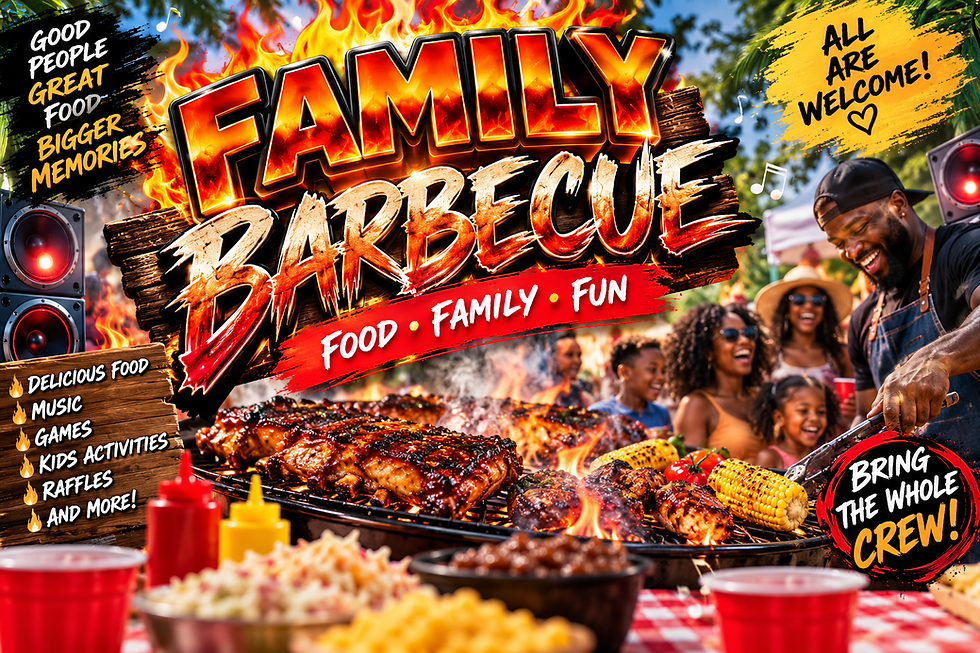
1. The Design Is Stuffed With Everything
AI often tries to explain concepts visually.
Sometimes it explains them too much.
Tell it you're having a family barbecue and it may give you:
a grill
steak
burgers
corn
smoke
flames
a picnic table
plates
utensils
a backyard
an apron
a cooler
condiments
speakers
happy relatives
somebody holding barbecue tongs
The flyer stops communicating an idea and starts looking like an illustrated inventory list.
Good design often depends just as much on what you leave out.
Canva's own flyer guidance identifies the headline, body copy and call to action as the critical informational elements of a flyer, with everything else serving the message rather than competing with it.
AI doesn't always behave as though everything else is optional.
You have to tell it.

2. Random Words Are Everywhere
This one makes me laugh because once you notice it, you cannot stop seeing it.
Ask for an inspirational educational flyer and suddenly the room is decorated with the literal words:
LEARN
GROW
CREATE
INSPIRE
DREAM
One word is on the chalkboard.
Another is framed on the wall.
Another is floating mysteriously behind someone's head.
Another appears on a book for absolutely no reason.
Then somebody's coffee cup says BELIEVE.
Why?
Because apparently the coffee believes in you too.
AI can treat words as part of the visual language of a concept instead of asking whether that particular word actually needs to be in the final design.
That's why AI flyers can end up covered in little slogans, labels and fragments of motivational copy that nobody asked for.

3. Everything Is Extremely Literal
AI often tries very hard to make sure you understand the topic.
Sometimes too hard.
If you're creating an image about corporations being sued, you probably don't need:
corporate logos
a judge's gavel
a courthouse
stacks of legal papers
somebody looking distressed
a giant balance scale
a judge in robes
a briefcase stuffed with documents
a red “confidential” folder
a broken handshake
money flying through the air
a cracked office building
flashing warning symbols
courtroom microphones
a giant legal stamp
angry executives pointing at each other
a newspaper headline about the case
the word LAWSUIT
all in one picture.
Human design frequently communicates through suggestion, mood, composition, metaphor and restraint.
Literal imagery isn't automatically bad.
If the subject is a corporate lawsuit, the image should probably still feel connected to law, conflict, accountability, business, or consequence.
The problem starts when AI tries to prove the point with every legal symbol it can think of at once.
You probably don't need the courthouse, the gavel, the scales of justice, stacks of legal papers, worried executives, corporate logos, a judge, and the word LAWSUIT all fighting for attention in the same frame.
One or two strong visual ideas can communicate the concept.
The giveaway is when every part of the subject becomes another object that has to appear somewhere in the image.
4. The Same Decorative Tricks Keep Appearing
One of my personal AI-image giveaways is what I call the rays.
Those little energetic lines shooting outward from the subject.
AI loves a good ray.

Then there are:
paint strokes
sparkles
tiny stars
glowing edges
random lightning bolts
floating particles
ornamental scribbles
light streaks
little decorative badges
abstract geometric shapes
Again, none of these is forbidden.
I've used them myself.
The giveaway is when they appear because empty space apparently made the machine nervous.
You don't need three paint strokes, four stars, two lightning bolts and a glowing swoosh to prove that something is exciting.
Negative space is allowed.
Let the flyer breathe.

5. The Typography Starts Looking Familiar
For energetic flyers in particular, I repeatedly see AI generate lettering that resembles distressed, graffiti, brush-painted and hand-painted display fonts.
One style I personally notice constantly reminds me of Edo-style lettering.
That does not mean every flyer using a distressed brush font was generated by AI.
It also doesn't mean the generator is literally choosing Edo from a font menu.
I'm talking about a recurring visual treatment.
Big.
Slanted.
Painted.
Distressed.
Usually surrounded by some combination of glowing outlines, drop shadows, strokes, sparks, rays and explosions.
Once you've seen enough AI event graphics, certain typography treatments start feeling very familiar.
If your headline immediately reminds you of ten other AI flyers you saw this week, that's worth noticing.

6. The People Look Like Cousins Who Have Never Met
Duplicate-looking people are another giveaway.
You ask for a crowd and somehow six women have nearly the same face.
Or the men all have suspiciously similar hair, jawlines and expressions.
Or two people in a split-screen image look like somebody duplicated one person and changed the shirt.
Generative systems have improved tremendously at faces, but visual homogenization can still happen.
Research published in Scientific Reports documented racial and gender stereotyping in Stable Diffusion XL and found that generated faces within some racial groups could also be unusually similar to one another.
So when you're looking at AI-generated groups, inspect them.
Don't just count heads.
Look at the people.

7. Something Is Anatomically Weird
Six fingers used to be the classic AI joke.
Models are much better now, but strange details still happen:
merged fingers
extra fingers
impossible jewelry
odd teeth
double pupils
glasses that melt into faces
objects attached to hands incorrectly
duplicated limbs
clothing that turns into furniture
earrings that become hair
background people that dissolve when you look closely
The larger image may look gorgeous.
Then you zoom in and discover somebody's thumb has a thumb.
Look closely before publishing.
A beautiful image can survive your first three seconds of attention and completely fall apart on the fourth.
8. The Image Defaults to Stereotypes
This one matters beyond aesthetics.
If I ask for a generic gamer, streamer, CEO, mechanic, nurse, scientist or teacher without specifying anything else, the generator still has to decide what that person looks like.
Those decisions can reflect stereotypes present in the human-created material and patterns the model learned from.
This isn't just something designers have noticed casually.
Research across text-to-image systems has documented racial, gender, cultural and occupational stereotyping in generated images. Studies published in 2025 and 2026 continue to find these patterns across popular image-generation systems.
So if you ask AI for a streamer and it repeatedly gives you the same kind of person, don't assume that is the only visual answer to streamer.
The machine is making decisions you didn't make.
And that's the larger thread connecting almost everything on this list.
The Biggest AI Tell Is How Many Decisions You Let It Make
That's really what this comes down to.
AI isn't automatically bad at design.
AI is incredibly good at producing something quickly.
But if you type:
Make me a cool flyer for my cookout
and then accept the first image...
the AI chose:
the composition
the people
the colors
the typography
the visual hierarchy
the style
the lighting
the decorations
the amount of clutter
the mood
the imagery
the stereotypes
the focal point
At that point, you didn't really direct the flyer.
You requested one.
And that's when the recognizable AI habits have the most room to creep in.
The good news is that you don't need to become a professional graphic designer to take some of those decisions back.
That's where De-AI-ing comes in.
In the next guide, I'm going to take the same kind of overloaded family-barbecue example we looked at here and show you how I would approach it differently: choosing the concept before generating the image, reducing the clutter, controlling the composition, stripping out unnecessary text, giving AI better direction and finishing the design yourself when it makes sense.
The goal isn't to stop using AI.
It's to stop letting AI make every creative decision for you.


Comments